 |
TSDuck v3.45-4777
MPEG Transport Stream Toolkit
|
|
TSDuck v3.45-4777
MPEG Transport Stream Toolkit
|
Base class for devices, files, or sockets which can work in non-blocking mode. More...
#include <tsNonBlockingDevice.h>
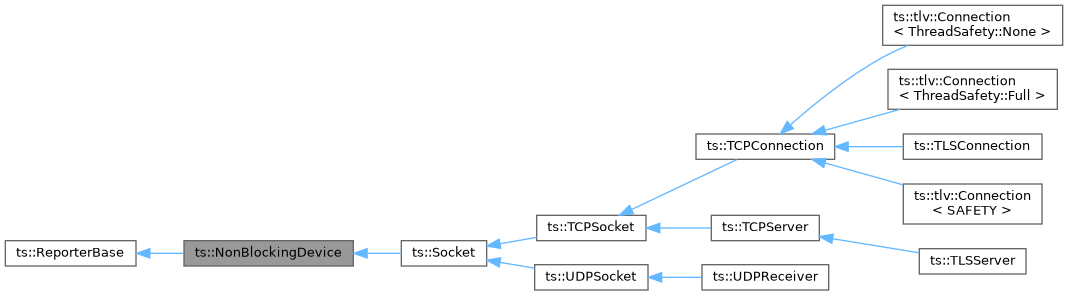
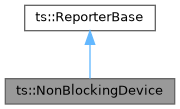
Classes | |
| class | IOSB |
| This structure indicates the status of a non-blocking I/O. More... | |
Public Member Functions | |
| NonBlockingDevice (Report *report, bool non_blocking=false) | |
| Constructor. | |
| NonBlockingDevice (ReporterBase *delegate, bool non_blocking=false) | |
| Constructor. | |
| virtual | ~NonBlockingDevice () override |
| Destructor. | |
| SysHandleType | getHandle () const |
| Get the underlying file descriptor or device handle. | |
| virtual SysHandleType | getReadHandle () const |
| Get the underlying file descriptor or device handle for read operations. | |
| SysSocketType | getReadSocket () const |
| Get the underlying file descriptor or device handle as a system socket handle for read operations. | |
| SysSocketType | getSocket () const |
| Get the underlying file descriptor or device handle as a system socket handle. | |
| virtual SysHandleType | getWriteHandle () const |
| Get the underlying file descriptor or device handle for write operations. | |
| SysSocketType | getWriteSocket () const |
| Get the underlying file descriptor or device handle as a system socket handle for write operations. | |
| bool | isNonBlocking () const |
| Check if the device is in non-blocking mode. | |
| bool | isSupportedByReactor (bool recheck=false) |
| Check if the device is supported by a reactor for non-blocking or asynchronous I/O. | |
| bool | muteReport (bool mute) |
| Temporarily mute the associated report. | |
| virtual Report & | report () const override |
| Access the Report which is associated with this object. | |
| bool | setNonBlocking (bool non_blocking) |
| Set the device in non-blocking mode. | |
| Report * | setReport (Report *report) |
| Associate this object with another Report to log errors. | |
| ReporterBase * | setReport (ReporterBase *delegate) |
| Associate this object with another ReporterBase to log errors. | |
Static Public Member Functions | |
| static bool | IsPendingStatus (int error_code) |
| This static method checks if a system error code means "I/O in progress" (asynchronous I/O) or "I/O would block" (non-blocking I/O). | |
| static int | SilentLevel (bool silent, int default_severity=Severity::Error) |
| Compute a log severity level from a "silent" parameter. | |
Protected Member Functions | |
| virtual bool | allowSetNonBlocking () const |
| Check that the non-blocking mode can be set. | |
| bool | checkNonBlocking (bool non_blocking, const UChar *opname) |
| Check the blocking mode of a device. | |
| bool | checkNonBlocking (IOSB *iosb, const UChar *opname) |
| Check the blocking mode of a device. | |
| int | genericSystemRead (void *addr, size_t max_size, size_t &ret_size, const AbortInterface *abort, NonBlockingDevice::IOSB *iosb, uint64_t position) |
| Generic system read operation. | |
| int | genericSystemWrite (const void *addr, size_t size, size_t &written_size, NonBlockingDevice::IOSB *iosb, uint64_t position) |
| Generic system write operation. | |
| bool | setSystemNonBlocking (bool non_blocking) |
| Low-level method to set the system file or socket descriptor in non-blocking mode. | |
Base class for devices, files, or sockets which can work in non-blocking mode.
The methods from this class should not be used by applications. They should be used only by "reactive classes", which work in combination with an event dispatcher.
The exact meaning of "non-blocking" depends on the type of device and the operating system. This is why this class shall be used by specialized classes which exactly know what they are doing.
There are two distinct I/O models:
Differences in semantics:
Differences in usage:
Important differences in canceling I/O and closing file descriptors or handles:
|
inlineexplicit |
Constructor.
| [in] | report | Where to report errors. The report object must remain valid as long as this object exists or setReport() is used with another Report object. If report is null, log messages are discarded. |
| [in] | non_blocking | It true, the device is initially set in non-blocking mode. |
|
inlineexplicit |
Constructor.
| [in] | delegate | Use the report of another ReporterBase. If delegate is null, log messages are discarded. |
| [in] | non_blocking | It true, the device is initially set in non-blocking mode. |
| bool ts::NonBlockingDevice::setNonBlocking | ( | bool | non_blocking | ) |
Set the device in non-blocking mode.
Important: Usually, this method must be called before opening the device, whatever it means. Otherwise it is ignored and the device blocking mode is unchanged.
| [in] | non_blocking | It true, the device is set in non-blocking mode. |
|
inline |
Check if the device is in non-blocking mode.
| bool ts::NonBlockingDevice::isSupportedByReactor | ( | bool | recheck = false | ) |
Check if the device is supported by a reactor for non-blocking or asynchronous I/O.
| [in] | recheck | If true, force a recheck. If false and the device was previously checked, return the previous cached value. |
|
inlinestatic |
This static method checks if a system error code means "I/O in progress" (asynchronous I/O) or "I/O would block" (non-blocking I/O).
| [in] | error_code | System error code. |
| SysHandleType ts::NonBlockingDevice::getHandle | ( | ) | const |
Get the underlying file descriptor or device handle.
This method is reserved for low-level operations and should not be used by normal applications.
On UNIX systems, sockets are standard file descriptors. On Windows systems, sockets and devices handles are two distinct types (SOCKET, an integer type, and HANDLE, a pointer type). However, SOCKET and HANDLE have the same size and can be converted between each other. In practice, all Windows device handles are pointers. When Microsoft decided to implement the BSD socket API, they needed to represent sockets as integers. The integer is simply a cast of the HANDLE pointer.
In practice, the methods getHandle() and getSocket() return the same value, represented as two different portable types, SysHandleType and SysSocketType. Note that this types are defined as their real representation. On UNIX systems, both are defined as int and are compatible. However, on Windows systems, they are defined as HANDLE and SOCKET and are not compatible. So, accidentally mixing the two compiles on UNIX but not on Windows. Be careful to use the right type for the right usage.
There is one important difference between getHandle() and getSocket(): the error values, SYS_HANDLE_INVALID and SYS_SOCKET_INVALID. Be careful, these constants have distinct binary values on Windows. This is the only case were it is not possible to cast between a SysHandleType value and a SysSocketType value. This is why it is recommended to always use getHandle() when a SysHandleType is required and getSocket() when a SysSocketType is required.
A subclass which uses file descriptors or device handles for read, write, or both, must override the methods getReadHandle(), getWriteHandle(), or both. If the two types of operations use the same file descriptor, the two methods must return the same value.
An application should call getReadHandle() for read operations and getWriteHandle() for write operations. The method getHandle() returns getReadHandle() if its returns a valid value, and getWriteHandle() otherwise.
|
virtual |
Get the underlying file descriptor or device handle for read operations.
Subclasses should override this method.
Reimplemented in ts::Socket, ts::BinaryFile, and ts::ForkPipe.
|
virtual |
Get the underlying file descriptor or device handle for write operations.
Subclasses should override this method.
Reimplemented in ts::Socket, ts::BinaryFile, and ts::ForkPipe.
| SysSocketType ts::NonBlockingDevice::getSocket | ( | ) | const |
Get the underlying file descriptor or device handle as a system socket handle.
| SysSocketType ts::NonBlockingDevice::getReadSocket | ( | ) | const |
Get the underlying file descriptor or device handle as a system socket handle for read operations.
| SysSocketType ts::NonBlockingDevice::getWriteSocket | ( | ) | const |
Get the underlying file descriptor or device handle as a system socket handle for write operations.
|
protected |
Check the blocking mode of a device.
Called by subclass methods which are explicitly called in blocking or non-blocking mode.
| [in] | non_blocking | The required non-blocking mode. |
| [in] | opname | Name of the operation, for the error message. |
Check the blocking mode of a device.
Called by subclass methods which are explicitly called in blocking or non-blocking mode.
| [in,out] | iosb | Address of an IOSB structure. If non-null, we are in non-blocking mode. When null, we are in blocking mode. When non-null, pending is reset to false and overlap is zeroed. |
| [in] | opname | Name of the operation, for the error message. |
|
protectedvirtual |
Check that the non-blocking mode can be set.
Must be implemented by subclasses which do not support setting the non-blocking in certain states, such as after being opened. The default implementation always allows setting the non-blocking mode.
Reimplemented in ts::Socket, ts::BinaryFile, and ts::ForkPipe.
|
protected |
Low-level method to set the system file or socket descriptor in non-blocking mode.
| [in] | non_blocking | It true, the device is set in non-blocking mode. |
Summary: Do not use this method unless you exactly know what you are doing.
UNIX: Depending on the way a file descriptor is created, it may be possible to specify the non-blocking mode from the beginning. Or it can be somehow inherited. However, this is not portable.
Examples:
In all cases, it is possible to set a file descriptor in non-blocking mode at any time using the method setSystemNonBlocking(). This method uses fcntl(F_SETFL) to alter the file descriptor's flags.
Windows: The natural way of not being blocked on I/O on Windows is asynchronous I/O. To increase the general confusion, there is some form of non-blocking mode on Windows sockets, and only sockets, not other forms of file handles. This mode is activated using "ioctlsocket(fd, FIONBIO, &mode)". When this mode is active, socket I/O become similar to UNIX: they immediately either succeed or fail, but never block. However, there is no way to get notified when the I/O becomes possible. There is no equivalent to epoll (Linux) or kqueue (macOS and BSD). The Windows I/O Completion Ports can only work on asynchronous I/O, using OVERLAPPED structures. Because this form of non-blocking mode is mostly useless in practice, we do not use it and the method setSystemNonBlocking() does nothing on Windows.
|
protected |
Generic system write operation.
This is a convenience method which can be used (or not) by subclasses when the system calls write() (UNIX) or WriteFile() (Windows) are appropriate.
| [in] | addr | Address of the data to write. |
| [in] | size | Size in bytes of the data to write. |
| [out] | written_size | Actually written size in bytes. Can be less than size in case of error in the middle of the write. |
| [in,out] | iosb | Address of an IOSB structure. If non-null, the stream must be in non-blocking mode. When null, the stream must be in blocking mode (the default). See the description of ts::NonBlockingDevice::IOSB. |
| [in] | position | This value is only used on Windows with asynchronous I/O on disk file. On Windows, when asynchronous I/O are used on random access files, the file position is not maintained. Each read or write operation is performed at the specified absolute position. |
|
protected |
Generic system read operation.
This is a convenience method which can be used (or not) by subclasses when the system calls read() (UNIX) or ReadFile() (Windows) are appropriate.
| [out] | addr | Address of the buffer for the incoming data. |
| [in] | max_size | Maximum size in bytes of the buffer. |
| [out] | ret_size | Returned input size in bytes. If zero, end of file has been reached or an error occurred. |
| [in] | abort | If non-zero, invoked when I/O is interrupted (in case of user-interrupt, return, otherwise retry). |
| [in,out] | iosb | Address of an IOSB structure. If non-null, the stream must be in non-blocking mode. When null, the stream must be in blocking mode (the default). See the description of ts::NonBlockingDevice::IOSB. |
| [in] | position | This value is only used on Windows with asynchronous I/O on disk file. On Windows, when asynchronous I/O are used on random access files, the file position is not maintained. Each read or write operation is performed at the specified absolute position. |
|
overridevirtualinherited |
Access the Report which is associated with this object.
Can be called from another thread only if the Report object is thread-safe.
Implements ts::ReporterInterface.
Associate this object with another Report to log errors.
| [in] | report | Where to report errors. The report object must remain valid as long as this object exists or setReport() is used with another Report object. If report is null, log messages are discarded. |
|
inherited |
Associate this object with another ReporterBase to log errors.
| [in] | delegate | Use the report of another ReporterBase. If delegate is null, the previous explicit Report is used.. |
|
inherited |
Temporarily mute the associated report.
| [in] | mute | It true, report() will return a null report (log messages are discarded), until muteReport() is invoked again with mute set to false. |
|
inlinestaticinherited |
Compute a log severity level from a "silent" parameter.
Some subclass methods have a "silent" parameter to avoid reporting errors which may be insignificant, typically when closing a device after an error, in which case the close operation may produce other errors if the previous error left the device in an inconsistent state. While those errors should not be displayed as errors, we still display them at debug level.
| [in] | silent | If true, do not report errors, report debug messages instead. |
| [in] | default_severity | Default severity, in non-silent mode (error by default). |
 1.9.8
1.9.8